Raspberry Pi Pico
The Raspberry Pi Pico microcontroller is a compact, powerful board with 26 general-purpose input/output pins. It can be programmed in Python and uses a 3.3V logic level (as opposed to the Arduino Uno, for instance, which uses a 5V logic level). It plugs straight into a computer via a USB B micro port, and can appear as a USB storage device to the computer which makes uploading Python programs to it as simple as copying the appropriate file right onto the drive.
The Raspberry Pi Pico is driven by a RP2040 chip at its core, which runs quickly (133MHz) and has quite a bit of memory available (2MB of Flash memory). Owing to these impressive stats and lots of design and architectural decisions, the board is capable of fairly high-level performance, doing things such as audio synthesis which would be difficult or impossible on an Arduino Uno.
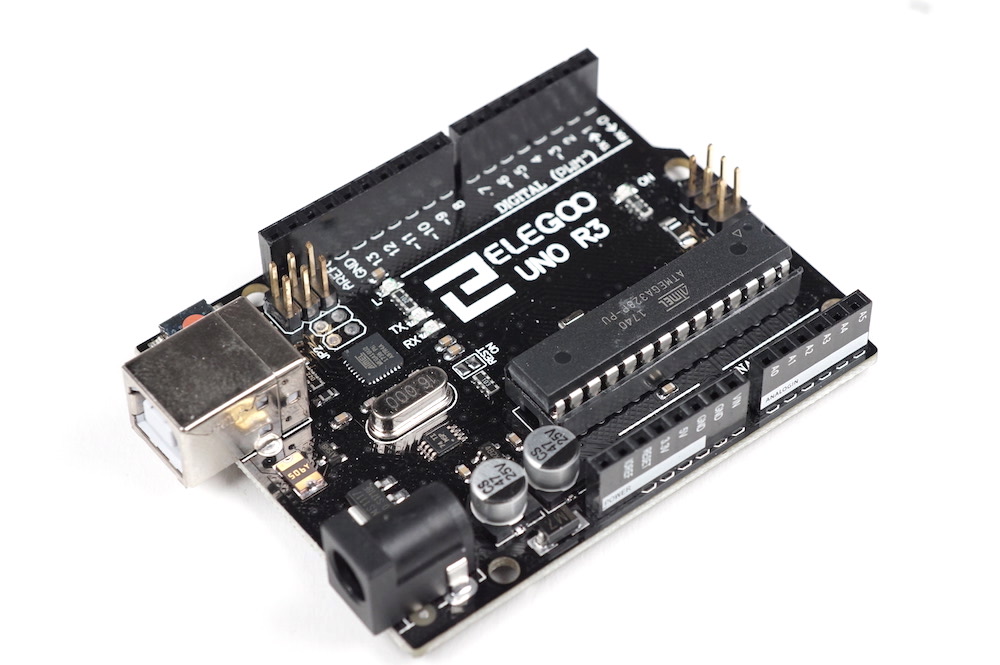
Arduino Uno
One would be best served by taking a deep dive into the official Arduino Uno page, but as a summary, let's dissect the overview given on the page:
- Arduino Uno is a microcontroller board based on the ATmega328P (datasheet).
The Arduino Uno's "brains" are the ATmega328P microchip, this is where the logical operations necessary to execute a program are done, where the program is stored, where the Uno has its memory, and so on.
- It has 14 digital input/output pins (of which 6 can be used as PWM outputs),
All output pins on an Arduino Uno are digital, meaning they can only supply 5V or no volts at all. Connections can be drawn between these pins and various chips, sensors, outputs, and other electronic devices. The Arduino Uno emulates an analog output pin with its 6 PWM output pins (marked by a ~). All of these digital output pins double as digital inputs, which can receive only binary information.
- 6 analog inputs,
The Arduino Uno has 6 input pins (prefixed by an A) which process analog information, or a continuous spectrum of data. Things like the exact value of a potentiometer's resistance can be read by these analog inputs.
In addition to the input/output pins, the Uno also has a suite of power-dedicated pins, such as ground, V(oltage)in, 5V, and 3.3V. Plus, it has three ways to transfer data: the UART communication paradigm, which operates on pins 1 and 0 to transmit and receive data; the I2C paradigm, which operates on the SDA (serial data) and SCL (serial clock) pins to transfer data between the Arduino and an external device and run the governing clock, respectively; and the SPI paradigm, which is similar to I2C, but you can use it to send data both ways simultaneously.
- a 16 MHz ceramic resonator (CSTCE16M0V53-R0),
It has a clock which helps regulate data lines.
- a USB connection, a power jack,
The Uno can be programmed from your computer through its USB port, and it can also receive power from your computer through this port. However, even when disconnected from the computer, it can also receive power through the power jack by hooking up a battery in the range of 7V-12V.
- an ICSP header and a reset button.
The ICSP header pins are another way of programming the Uno that's less commonly used, and the reset button clears all instructions living on the board when pressed, since whenever the Uno is turned on, it remembers the last program downloaded onto it.
Arduino Uno
You could check out Adafruit's Learn Arduino guides, or reference previous physical computing galleries of work, many of which were powered by the Uno: https://courses.ideate.cmu.edu/60-223/s2022/reference/previous-semesters !
Arduino Uno
| Part | Location | On floor | Backstock | |
|---|---|---|---|---|
| 0028 | rigid mounting base, for Arduino Uno footprint | — | 0 | 0 |
| 0084 | microcontroller, ATTiny84A, 12 I/O pins | Controller: Controller | 19 | 0 |
| 0085 | microcontroller, ATTiny85, 5 I/O pins | Controller: Controller | 46 | 25 |
| 0597 | Arduino Pro Micro, 5V, 16MHz, ATmega32U4 processor, USB native (can imitate mouse/keyboard), micro USB port | Controller: Controller | 6 | 4 |
| 0614 | Teensy 2.0 microcontroller | B15-R3-C2 | 0 | 0 |
| 0616 | Teensy 3.2 microcontroller | Special Parts Cabinet | 2 | 0 |
| 0617 | Teensy 4.1 microcontroller | Special Parts Cabinet | 12 | — |
| 0668 | Light Blue Bean microcontroller, Bluetooth on board, with 3-axis accelerometer and RGB LED | Special Parts Cabinet | 6 | 0 |
| 1000 | The Arduino gets instructions from a computer and follows them as long as it has power. It can be an input, output, or both. | Special Parts Cabinet | 18 | 0 |
| 1005 | The Raspberry Pi Pico gets instructions from a computer and follows them as long as it has power. It can be an input, output, or both. | Controller: Controller | 5 | 31 |
| 1262 | microcontroller, used in Arduino Uno and others, ATMega328P-PU | Controller: Controller | 5 | 5 |
| 6001 | Arduino starter kit, with Arduino Uno and variety of input/output devices and electronics, Elegoo "Super Starter" kit | — | — | 0 |
| 6017 | basic Arduino kit, REXQualis | — | — | 21 |
| 8045 | Blend micro | Special Parts Cabinet | 0 | — |